In one sentence: Mkodisha sends each tenant a rent bill (an invoice) every month, collects the money by M-Pesa or bank, ticks the bill off when it is paid, and keeps a receipt for everyone.
The simple version
- On the 1st of the month, Mkodisha writes a bill for every tenant: "October rent, KES 35,000".
- The tenant pays: from the app (an M-Pesa prompt pops up on their phone), straight to your paybill, or in cash.
- Mkodisha matches the money to the right bill and marks it paid. If only part is paid, it shows what is left.
- Everyone gets a receipt, and your charts update.
You do not need to type anything for steps 1, 3 and 4.
Why Mkodisha does this better
- Money goes straight to you. With your own M-Pesa paybill, Mkodisha only reads the payments; it never holds your money. With Tuma, rent is paid out to your bank account.
- No more matching by hand. Payments with the right house number match themselves. The few that don't wait in one list for you to sort with two clicks.
- Partial payments are handled. Pay KES 18,000 of 45,000 and the bill shows Partially paid, KES 27,000 left.
- Overpayments are not lost. Extra money pays the tenant's newest unpaid bill first; anything left over goes into their wallet for next month.
- Invoices create themselves. Set a tenant's rent once and Mkodisha raises the bill every month.
Where to find it
| What | Link |
|---|---|
| Payments page (all transactions) | mkodisha.com/app/containers/Pages/Invoices |
| Tenant payment records | mkodisha.com/app/containers/Pages/Invoices#tenant-payment-records |
| M-Pesa paybill transactions | mkodisha.com/app/containers/Pages/Invoices#mpesa-paybill-transactions |
| Unresolved / resolved paybill payments | #unresolved-transactions, #resolved-transactions, #mpesa-analytics on the Payments page |
| Your payment methods | mkodisha.com/app/containers/Pages/Bill#tenant-billing-and-monthly-charges-management (avatar menu → Billing) |
| A building's automatic invoices (Active Bills) | Properties → Automated Bills, or mkodisha.com/app/rental-units/<building id>/active-bils |
Payments and invoices: what's the difference?
| Invoice | Payment (transaction) | |
|---|---|---|
| What it is | A bill: "you owe October rent" | Money actually received |
| Example | Monthly Rent, OCT 2026, KES 45,000 | KES 18,000 by M-Pesa on 12 Oct |
| Status | Unpaid, Partially paid, Paid | Confirmed, Processing, Failed… |
| Reference | A 7-character payment ID the tenant can quote | The M-Pesa or bank transaction code |
One invoice can be paid by several payments (for example two halves), and one payment can pay off more than one invoice.
Step 1: See every payment
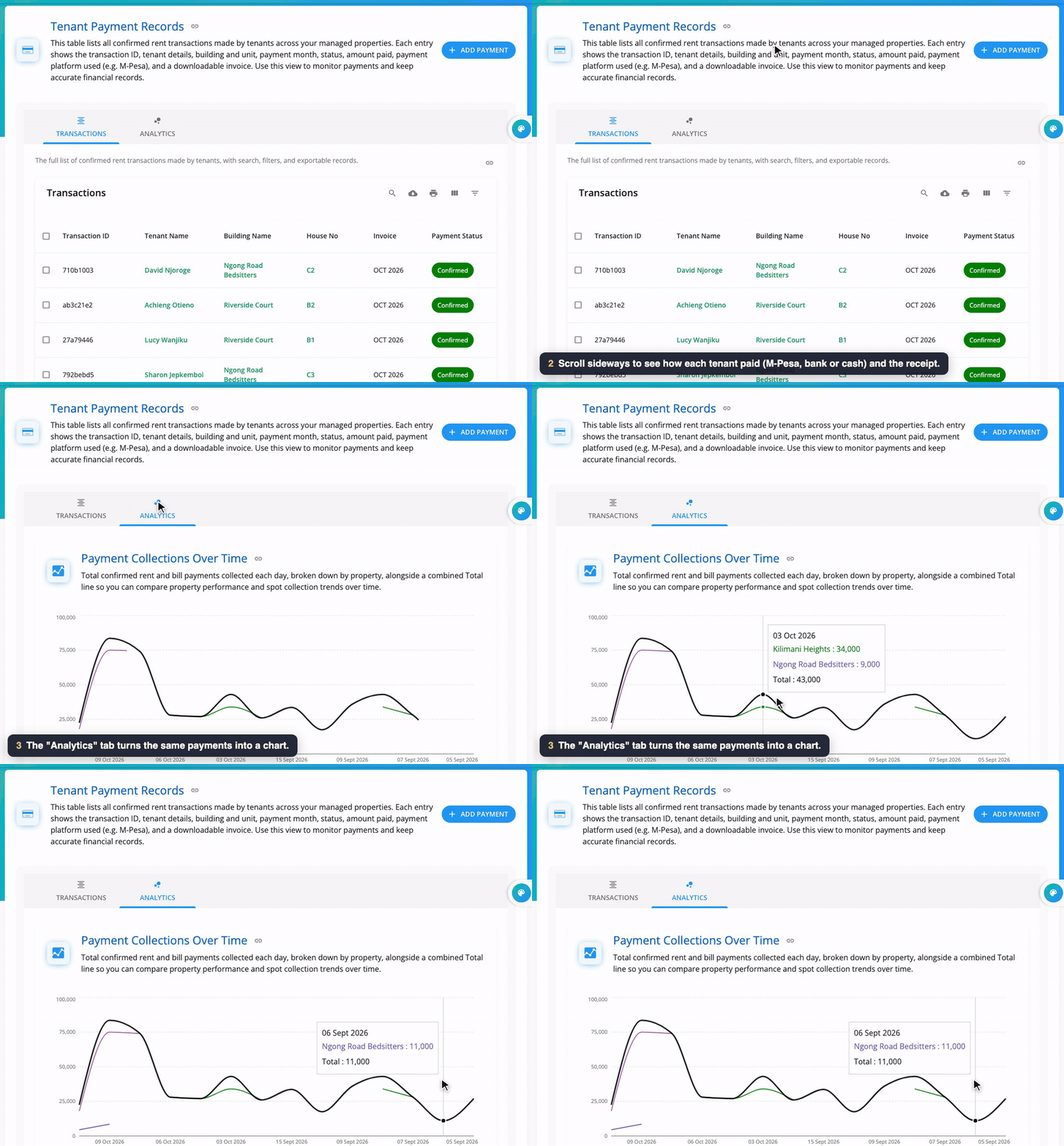
Open Payments in the menu. Tenant Payment Records lists every confirmed payment: the transaction ID, tenant, building, house, which month it paid, the status, the amount and how it was paid (M-Pesa, Tuma/bank or Manual). Search, filter, print or download it as a spreadsheet with the buttons on the right. The Analytics tab shows collections as a chart.
Step 2: Open a receipt
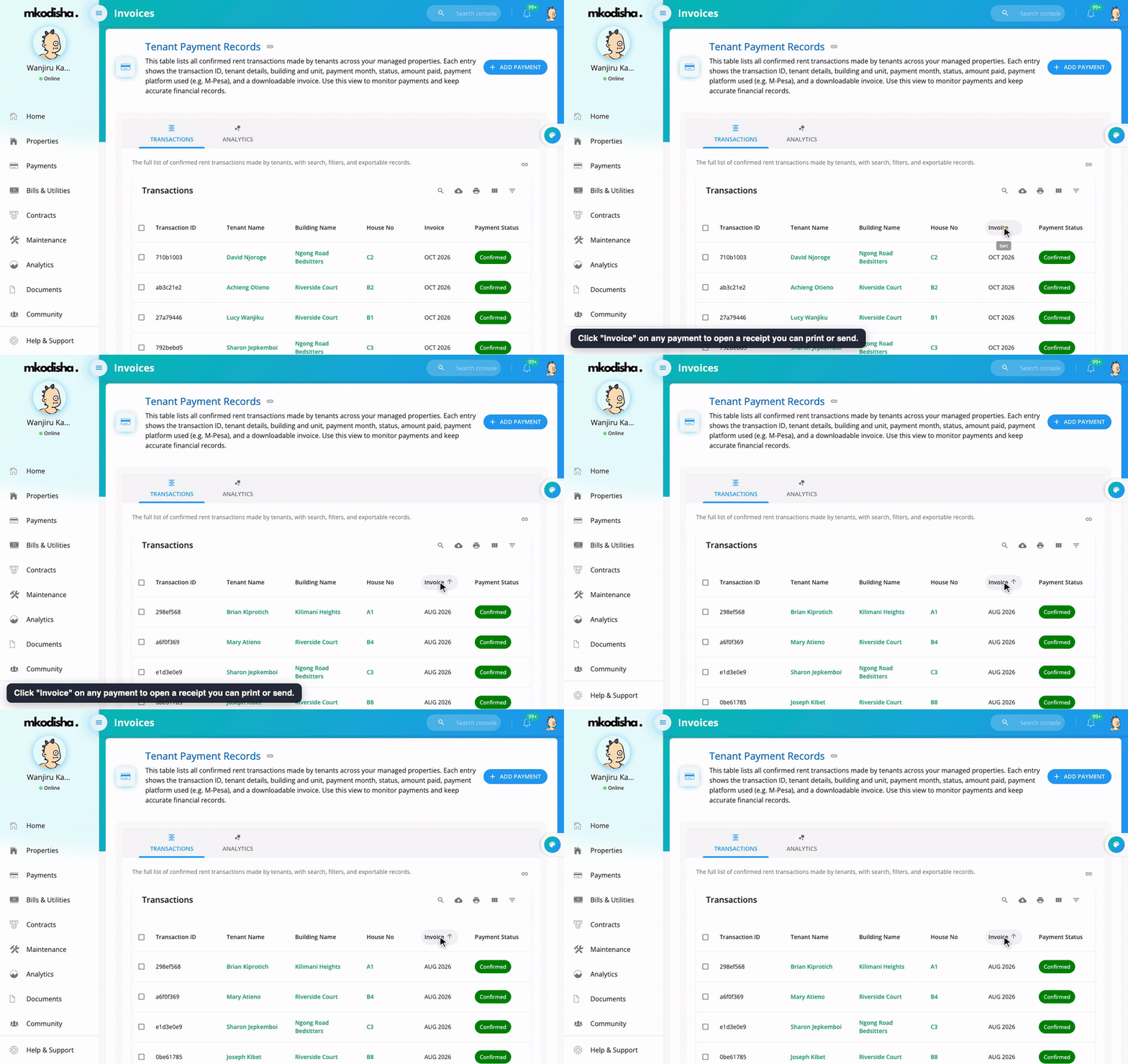
Click Invoice on any payment to see the receipt, ready to print or send. Tenants see the same receipts under Receipts.
Step 3: Record cash or a direct bank deposit
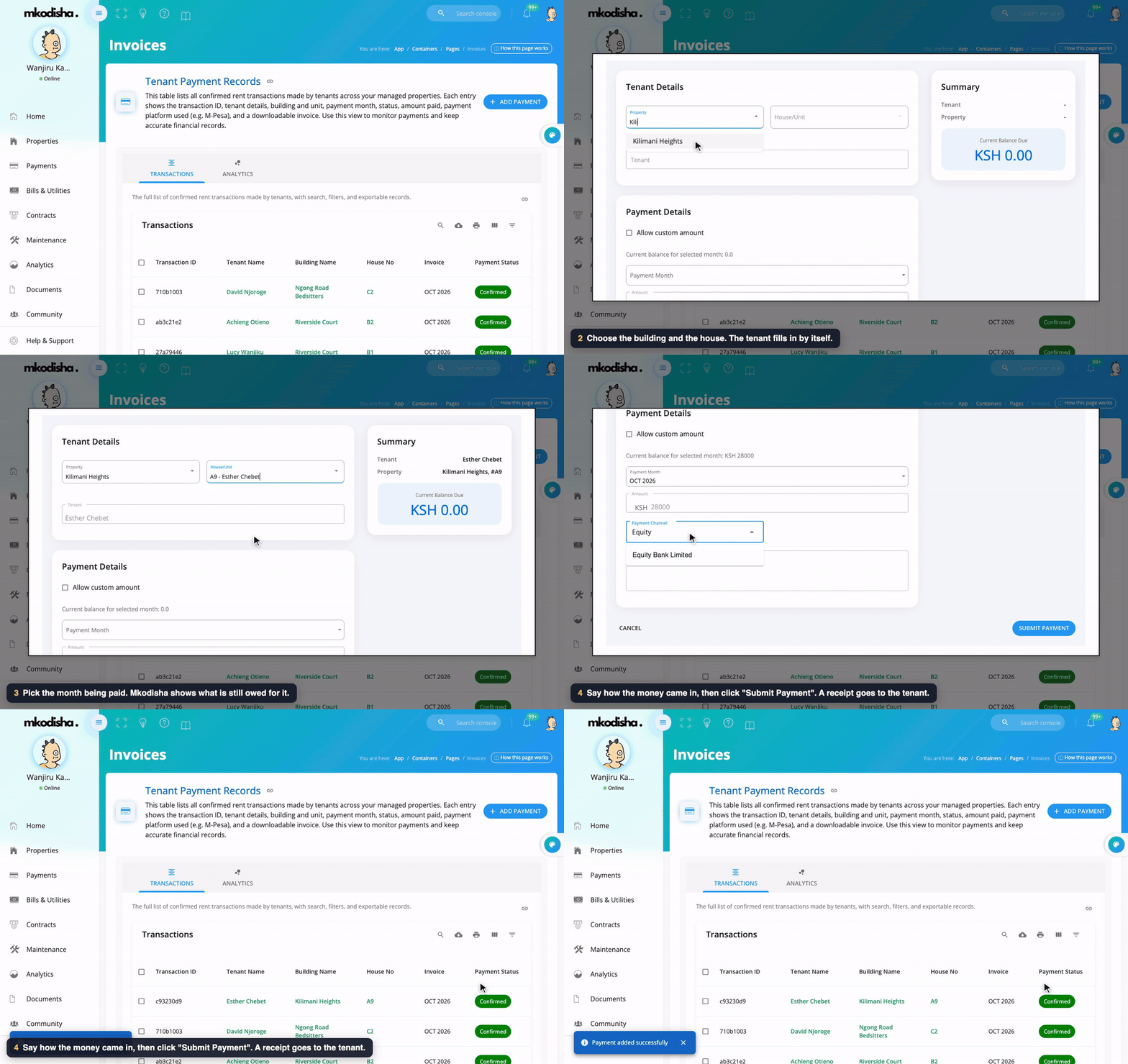
- Click Add Payment.
- Choose the Property and House/Unit. The tenant fills in automatically, with their current balance.
- Choose the Payment Month. Mkodisha shows what is still owed for it. Tick Allow custom amount to type a different amount.
- Choose the Payment Channel (the bank or method), optionally type a confirmation message, and click Submit Payment.
The invoice is updated and the tenant is notified.
Step 4: Sort M-Pesa payments that didn't match
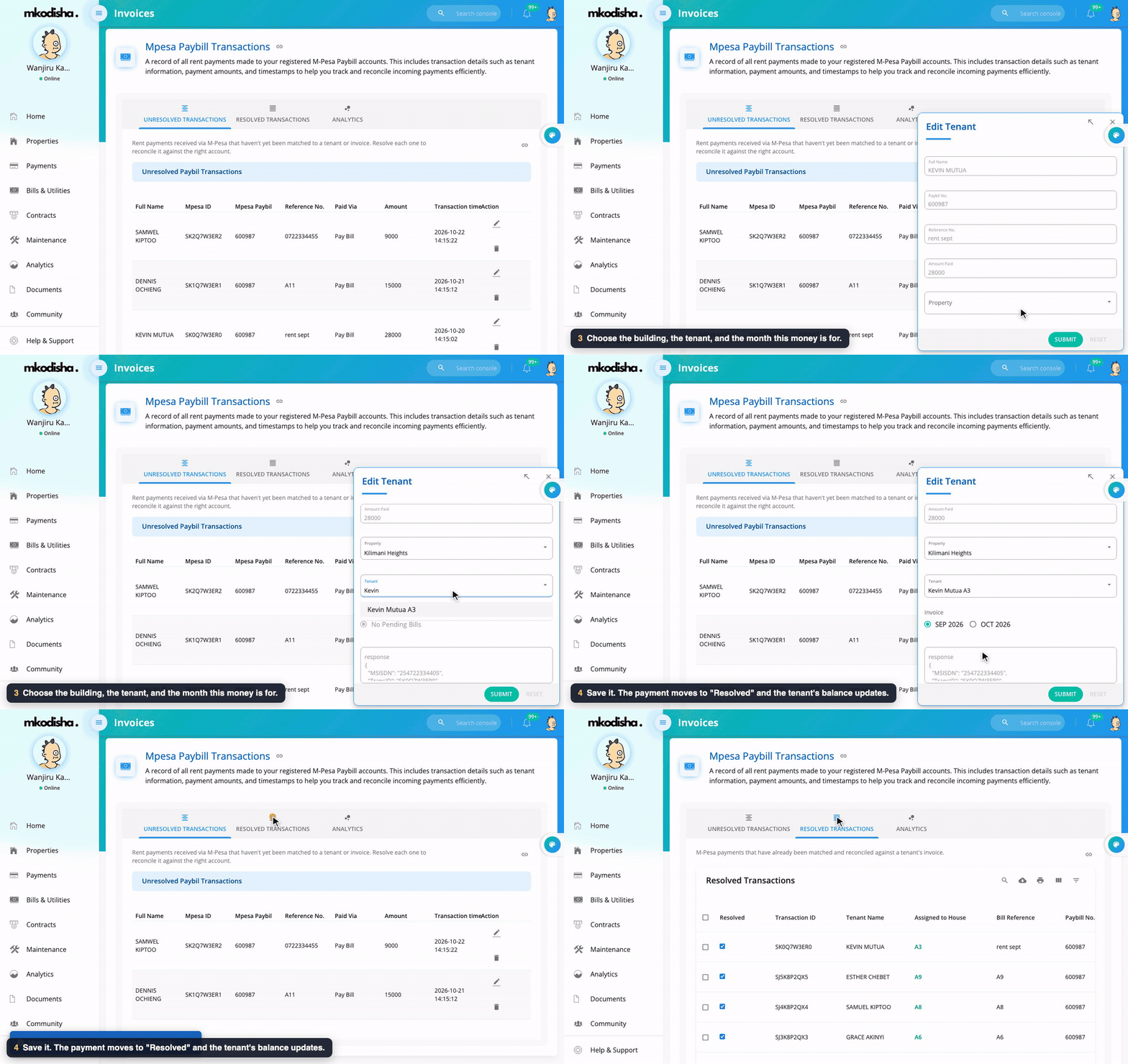
When a tenant pays your paybill with their house number as the account number (for example A3), Mkodisha matches it by itself; it appears under Resolved Transactions.
If they typed something else ("rent sept", a phone number, the wrong house), the payment waits under Unresolved Transactions:
- Click the pencil on the payment.
- Choose the Property, the Tenant, and the invoice (month) it is for.
- Click Submit. It moves to Resolved, the invoice is updated, and the charts refresh.
The Analytics tab shows how much came in through the paybill over time.
Step 5: Let Mkodisha create invoices for you
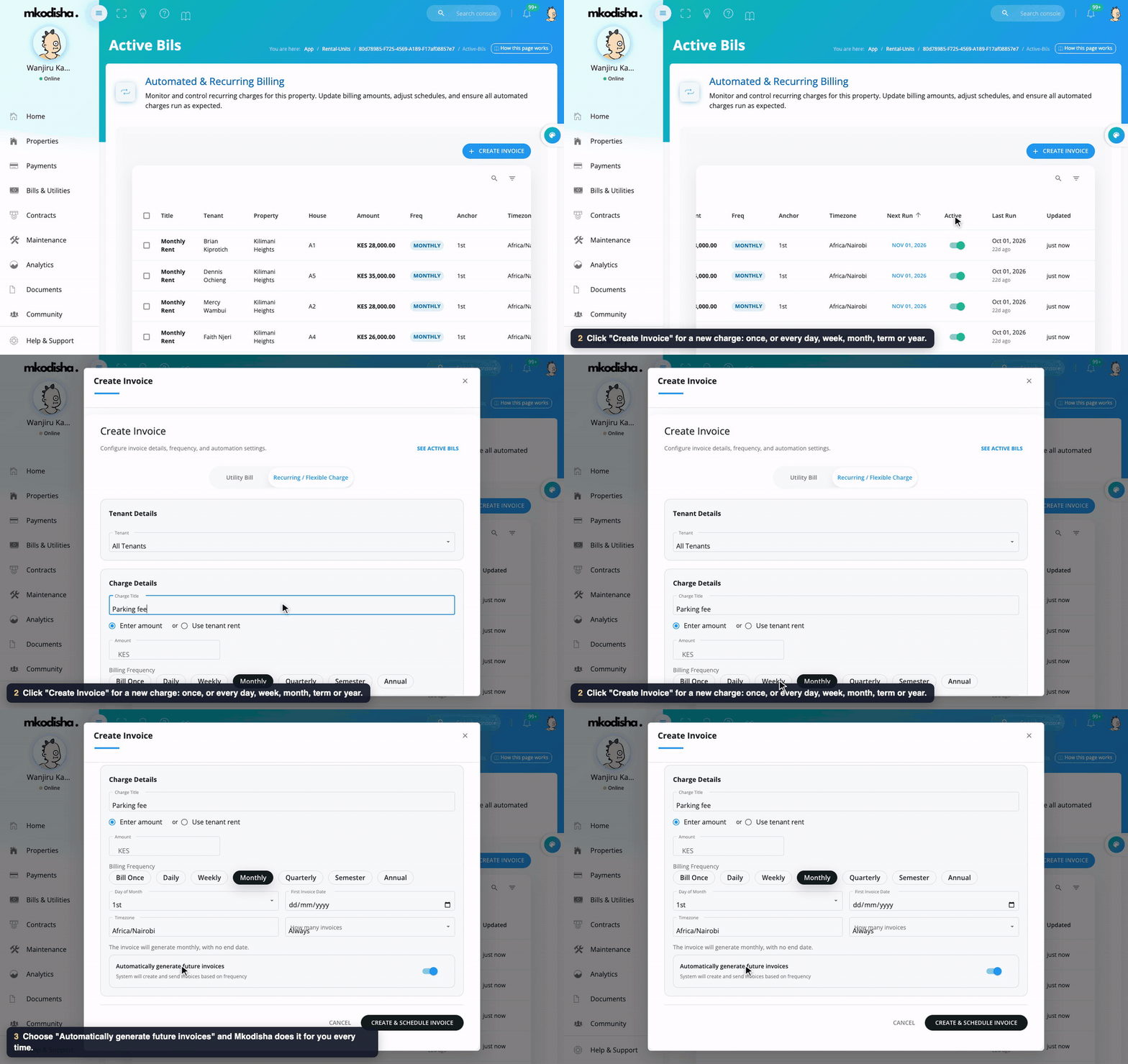
Active Bills (the Automated Bills button on a building) lists every automatic invoice: who it's for, how much, how often, and the next run date.
To add one, click Create Invoice:
- Utility Bill or Recurring / Flexible Charge (rent, parking, service charge…).
- Choose the tenant (or all tenants), give the charge a title, and either Enter amount or Use tenant rent.
- Choose how often: Bill Once, Daily, Weekly, Monthly, Quarterly, Semester or Annual, and the day of the month.
- Tick Automatically generate future invoices and click Create & Schedule Invoice.
When each invoice is raised, the tenant gets a notification with the amount and its payment ID. If they have money in their wallet, Mkodisha uses it on the new invoice straight away.
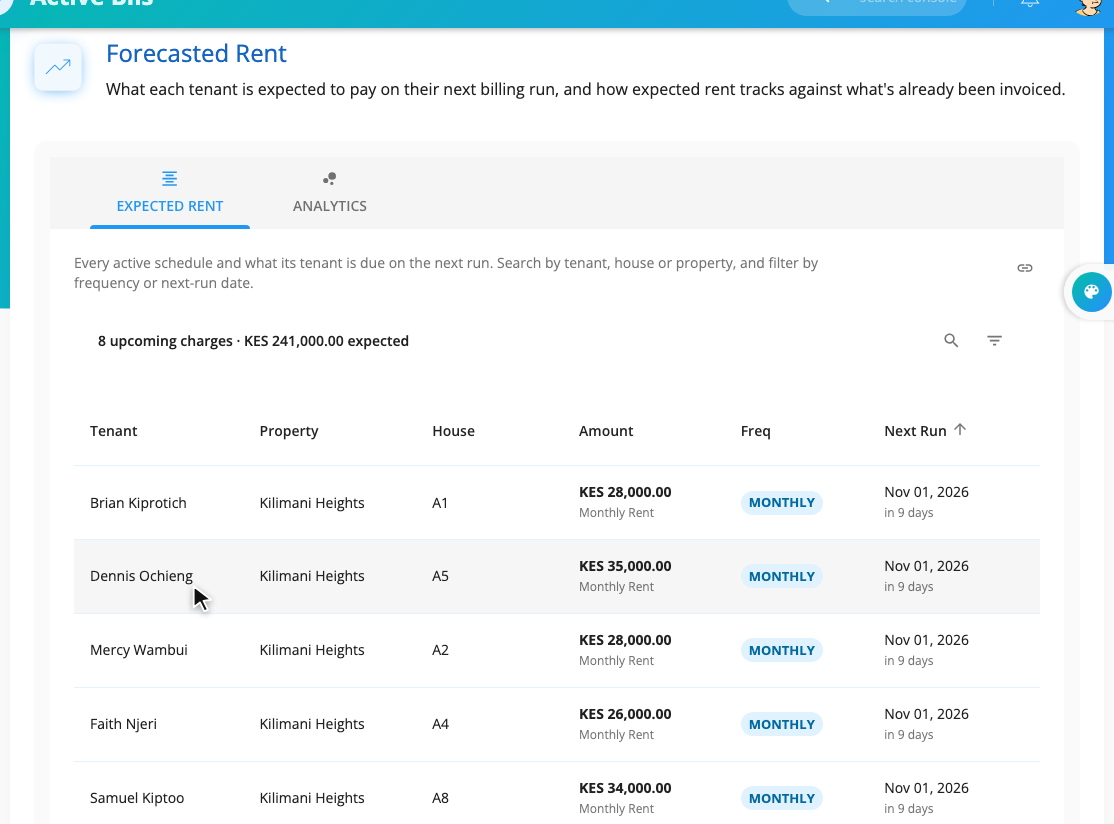
Forecasted Rent (on the same page) shows what each active schedule will bring in, so you can plan ahead.
Step 6: Choose how tenants pay you
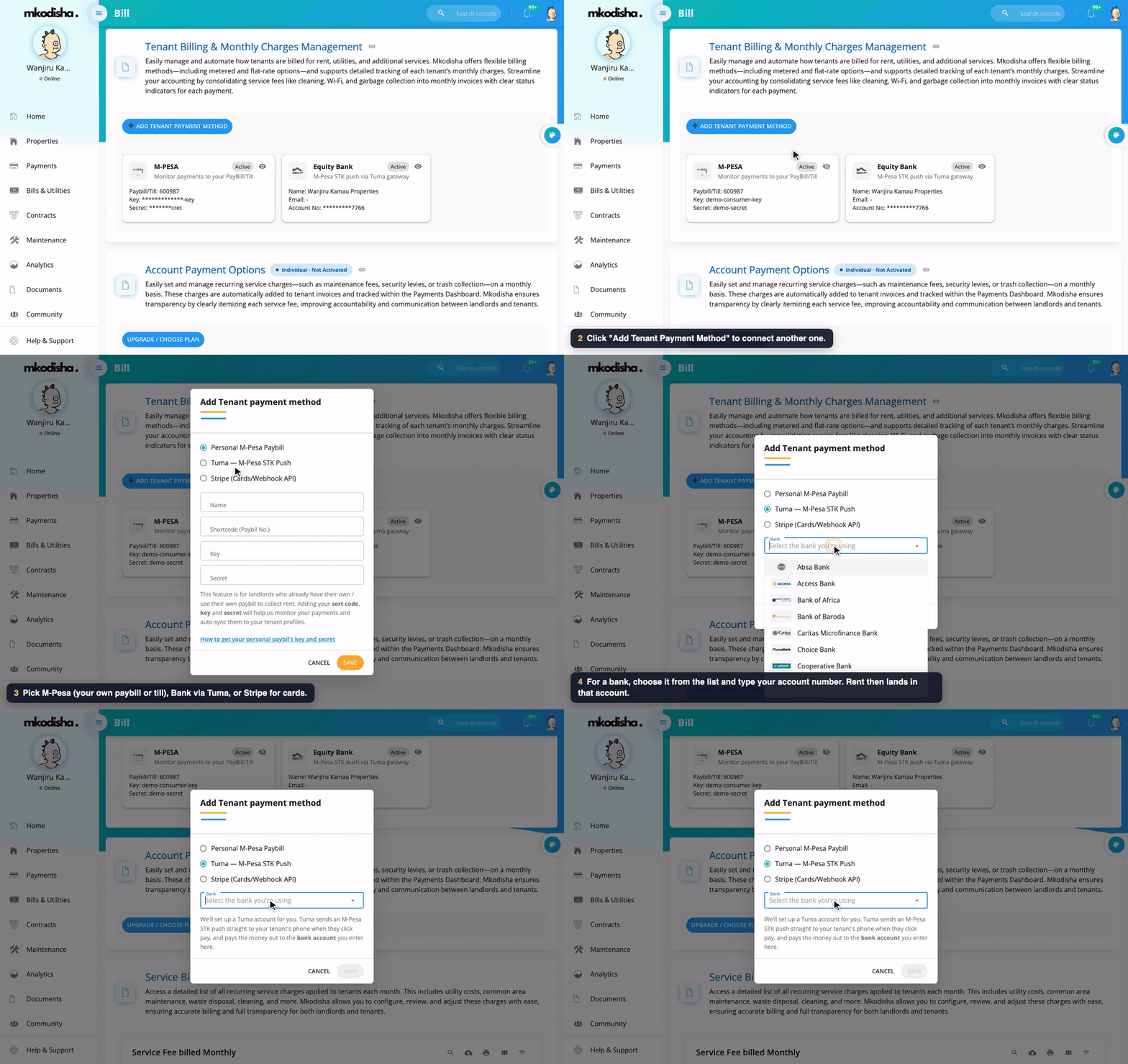
Open the avatar menu (top right) → Billing. Under Tenant Billing & Monthly Charges Management you'll see your payment methods, and Add Tenant Payment Method to connect another:
| Method | How it works | Money goes to |
|---|---|---|
| Personal M-Pesa Paybill (or till) | You add your paybill's shortcode, key and secret. Mkodisha watches the paybill and records every payment. | Your own paybill. Mkodisha never touches the money. |
| Tuma (M-Pesa STK push) | Mkodisha sets up a Tuma account for you. When a tenant clicks Pay, an M-Pesa PIN prompt pops up on their phone. | The bank account you choose (any of 42 banks and saccos). |
| Stripe | Card payments, for tenants paying by Visa or Mastercard. | Your Stripe account. |
Each building uses one of your methods (shown as Method on its card). The full list of banks, and how tenants pay step by step, is in Landlord and Tenant Billing.
How Mkodisha applies money
- A payment made against one invoice (from the app, or a paybill payment with the house number) pays that invoice first.
- Anything extra, and any payment not aimed at one invoice, pays the tenant's newest unpaid invoice first, then the next newest, and so on.
- Money left after every invoice is paid goes to the tenant's wallet and is used on their next invoice.
Videos
Quick answers
Does Mkodisha keep my money? No. With your own paybill, money goes straight to it; Mkodisha only reads the records (with your authorisation from Safaricom). With Tuma, money is paid out to your bank account.
Can Mkodisha see payments made straight to my paybill, without the app? Yes, once your paybill is connected. If the tenant used their house number as the account, it matches automatically; otherwise it waits under Unresolved for you.
What should tenants type as the account number?
Their house number exactly as it is in Mkodisha, for example A3.
A tenant paid too much. What happens? The extra pays their newest unpaid invoice; anything left goes to their wallet for next month.
How do I record a cash payment? Payments → Add Payment, choose the house and month, and submit.
How do I set up monthly rent invoices? Open the building's Automated Bills, click Create Invoice, choose Use tenant rent, Monthly, and tick Automatically generate future invoices.
Words to know
| Word | Meaning |
|---|---|
| Invoice | A bill for one month's rent or one charge |
| Transaction | A payment that actually came in |
| Paybill | An M-Pesa business number tenants pay into |
| STK push | The M-Pesa PIN prompt that pops up on a phone |
| Tuma | The payment partner that sends STK pushes and pays out to your bank |
| Resolved / unresolved | A paybill payment matched / not yet matched to a tenant |
| Wallet | A tenant's prepaid money, used on their next invoice |